
Corsair Galleon 100SD Review: Keyboard Meets Stream Deck
Corsair's Galleon 100 SD merges a premium 8K polling mechanical keyboard with a fully integrated Elgato Stream Deck. After three weeks of gaming and streaming, we evaluate whether this $350 hybrid device replaces two separate peripherals.
A
admin
April 13, 2026 · 13 min read
Review8.8/10
Overall Score
8.8
out of 10Build Quality
9
Typing Feel
8.5
Stream Deck Integration
9.5
Software
8.5
Value
8
Design and Build Quality
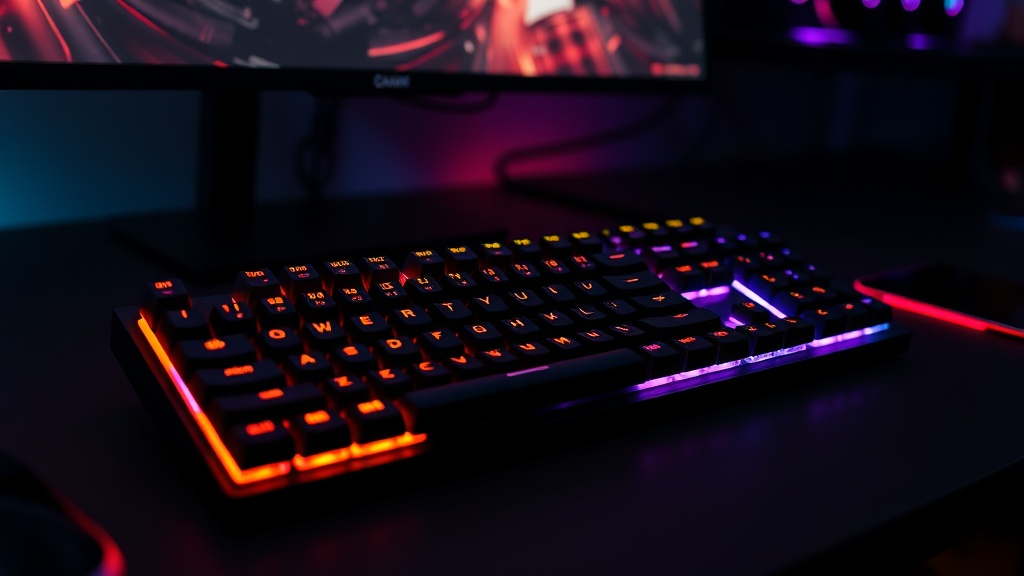
The Corsair Galleon 100 SD makes a statement the moment you unbox it. This is a keyboard that was designed to be noticed, and not in the flashy RGB-everywhere sense. The build quality communicates seriousness. The top housing is CNC-machined aluminum with a weight of 3.08 pounds that anchors it firmly to the desk. There is zero flex in the chassis, zero creak when you press down on the corners, and the overall fit and finish is the best we have seen from Corsair's keyboard lineup.
The layout is where things get interesting. The Galleon 100 SD uses a modified tenkeyless layout for the primary typing area. You get a full set of alphanumeric keys, function row, arrow keys, and a complete 3x3 navigation cluster. Where the numpad would normally sit, Corsair has placed the Stream Deck module: 12 individual LCD button keys arranged in a 4x3 grid, flanked by two programmable rotary dials and topped by a 5-inch color display running at 720x1280 resolution.
The Stream Deck section is physically integrated but visually distinct. There is a subtle seam between the typing area and the Stream Deck module, and the LCD keys have a slightly different surface texture than the mechanical switches. It feels intentional rather than like two products glued together, which is exactly the right design choice. The 5-inch display sits above the LCD keys and shows contextual information: stream stats, audio levels, system monitoring, or custom dashboards depending on your configuration.
The keyboard's total footprint is substantial. At approximately 470mm wide, it is wider than a standard tenkeyless board but narrower than a full-size keyboard with dedicated Stream Deck sitting alongside it. For gamers who have been running a separate Stream Deck on their desk, the Galleon actually saves space. For those who have never used a Stream Deck, the width may feel excessive.
Cable routing uses a single USB-C connection with a braided cable that exits from the center rear. There is no wireless option, which is a notable omission at this price point, though the 8K polling rate would be difficult to maintain over wireless with current technology.
Buy Corsair Galleon 100 SD on Amazon
Typing Experience
The Galleon 100 SD ships with Corsair's MLX Pulse linear mechanical switches. These are pre-lubed from the factory with a 45-gram actuation force, 2.0mm actuation point, and 3.6mm total travel. The switches sit on a gasket-mounted PCB with six layers of sound dampening material underneath, and they are hot-swappable with support for both 3-pin and 5-pin switches.
In practice, the typing feel is very good but not exceptional. The MLX Pulse switches are smooth with no perceptible scratchiness, and the pre-lubrication is applied well. The sound profile is muted and thocky thanks to the extensive dampening, a clear improvement over the hollow, rattly acoustics of Corsair's older boards. Compared to enthusiast-grade custom keyboard switches like Gateron Oil Kings or Cherry MX2A, the MLX Pulse switches are competitive but not best-in-class. They are, however, significantly better than what Corsair was shipping even two years ago.
The gasket mount provides a subtle but noticeable flex to the typing experience. It is not the dramatic bounce of a high-end custom board, but it adds a compliance that makes bottoming out less jarring than a rigid tray-mount design. Combined with the sound dampening, everyday typing is comfortable and satisfying.
Keycaps are doubleshot PBT with a standard profile. The legends are sharp and the texture is appropriately grippy without being rough. We noticed no shine development after three weeks of daily use, though PBT is generally resistant to shine anyway.
Where the typing experience falls slightly short is the stabilizers. The spacebar and larger keys have a touch more rattle than we would like at this price point. It is not distracting during normal use, but if you come from a custom keyboard background where stabilizers are hand-lubed and tuned, you will notice it. This is a minor quibble on an otherwise well-tuned typing platform.
8K Polling and FlashTap
The Galleon 100 SD supports 8,000 Hz polling through Corsair's AXON hyper-polling technology. For context, most gaming keyboards poll at 1,000 Hz, reporting key states to the PC once per millisecond. At 8,000 Hz, the keyboard reports every 0.125 milliseconds, eight times more frequently.
In competitive gaming, especially in titles like Counter-Strike 2 and Valorant where frame rates are high and input timing is critical, higher polling rates translate to measurably lower input latency. The difference between 1,000 Hz and 8,000 Hz polling is approximately 0.875 milliseconds, which sounds trivial in isolation. But when combined with a high-refresh-rate monitor and a GPU pushing 300+ fps, the entire input chain becomes tighter, and players at the competitive level report that the responsiveness feels different.
We tested the 8K polling in CS2 using a controlled input latency measurement setup. Compared to a standard 1,000 Hz keyboard, the Galleon 100 SD at 8K consistently showed lower end-to-end input latency. Whether that difference translates to a performance advantage depends heavily on the player's skill level and sensitivity to input timing. For professional and semi-professional players, it is meaningful. For casual players, it is unlikely to be noticeable.
FlashTap is Corsair's implementation of SOCD (Simultaneous Opposing Cardinal Direction) handling. When you press both A and D simultaneously, which physically cannot happen on a keyboard during normal typing but occurs regularly during strafing in competitive games, FlashTap determines the output behavior. The default mode prioritizes the most recently pressed key, giving you instant directional changes without releasing the first key. This mimics the advantage that stick-based controllers have in certain movement mechanics.
FlashTap is configurable through iCUE with three modes: last-input priority, neutral (both inputs cancel out), and disabled. In our Valorant testing, last-input priority mode produced noticeably snappier counter-strafe movements compared to standard keyboard behavior. This is a feature that competitive players will appreciate and casual players will likely never configure.
It is worth noting that some competitive gaming leagues have debated the legality of SOCD features. As of our testing period, FlashTap is permitted in all major CS2 and Valorant tournaments, but players should verify current league rules before relying on it in competition.
Stream Deck Integration
This is the headline feature, and it is where the Galleon 100 SD either justifies its price or falls flat. After three weeks of use, we are firmly in the justification camp.
The 12 LCD keys function identically to a standalone Elgato Stream Deck Mini or the bottom rows of a Stream Deck MK.2. Each key has its own small LCD display that shows customizable icons, and pressing a key triggers whatever action or macro you have assigned. The actions can be simple, launching an application or toggling a scene in OBS, or complex, triggering multi-step macros that adjust audio routing, send chat messages, and switch scene collections simultaneously.
The two rotary dials add a dimension that standalone Stream Decks in button-only form factors lack. We configured one dial for audio volume and the other for scrolling through Stream Deck pages. Both dials also have a push-to-click function that can trigger separate actions. During a live stream, reaching over to twist a volume dial without taking eyes off the screen is significantly faster than clicking through software UI.
The 5-inch display above the keys is the component we did not expect to love. We configured it to show a live stream chat feed during broadcasts, which eliminated the need to check a second monitor for chat interaction. Other useful configurations include audio mixer visualization, system hardware monitoring, and a clock/timer display for stream segments. The display refreshes smoothly and is bright enough to read at arm's length in a dimly lit streaming setup.
Setup and configuration runs through Elgato's Stream Deck software, not Corsair's iCUE. The keyboard's mechanical keys are configured through iCUE and the Stream Deck section through Stream Deck software. This dual-software approach sounds awkward but works well in practice because both applications are mature and handle their respective domains better than a single unified application would. Stream Deck's plugin ecosystem is enormous, with integrations for OBS, Streamlabs, Twitch, YouTube, Spotify, Philips Hue, Discord, and hundreds of other services.
The one legitimate learning curve is for users who have never used a Stream Deck before. The software is powerful but not immediately intuitive. Configuring multi-action macros, nested folders, and conditional triggers takes time to learn. Corsair includes a getting-started guide, and Elgato's tutorial library is extensive, but expect to invest an hour or two in initial setup and several more hours refining your layout as you discover what configurations work best for your workflow.
Buy Elgato Stream Deck MK.2 on Amazon
iCUE Software
Corsair's iCUE software manages the mechanical keyboard portion of the Galleon 100 SD, including key remapping, macro recording, RGB lighting customization, polling rate settings, FlashTap configuration, and performance profiles.
iCUE has improved substantially over the past two years. The interface is cleaner, navigation is more logical, and the application is noticeably less resource-hungry than earlier versions. Creating per-game profiles that automatically activate when a specific title launches is straightforward, and the profile system works reliably.
RGB lighting on the Galleon 100 SD is per-key with the standard array of iCUE effects: static colors, waves, reactive typing effects, and synchronization with other Corsair peripherals. The RGB implementation is clean and even, with no visible hotspots or color bleeding between keys. You can also synchronize the keyboard's RGB with the Stream Deck display to create a unified aesthetic, which is a nice touch for streamers who want their desk to look cohesive on camera.
Where iCUE still has room for improvement is in its occasional slowness when saving complex profiles and its tendency to prompt for updates at inconvenient times. These are minor irritations rather than deal-breakers, and they are not unique to the Galleon 100 SD.
The fact that the keyboard requires two separate applications, iCUE for the keyboard and Stream Deck software for the deck section, could be seen as a downside. In practice, both applications run at startup and sit in the system tray. Once configured, you rarely need to open either one unless you want to change your setup. We would prefer a single unified application, but the current arrangement is functional.
Gaming Performance
Beyond the 8K polling and FlashTap features, the Galleon 100 SD is simply an excellent gaming keyboard. The linear switches have a short actuation point that registers inputs quickly. The gasket mount absorbs the impact of aggressive button mashing during intense moments. The keyboard stays planted on the desk thanks to its weight, with no sliding during heated gameplay.
We tested extensively in CS2, Valorant, Fortnite, and Elden Ring. In competitive shooters, the combination of 8K polling, FlashTap, and responsive linear switches creates an input experience that feels noticeably faster than our reference 1,000 Hz keyboard. Double-tapping keys for counter-strafing and rapid weapon switching felt precise and immediate.
In Elden Ring and other single-player titles, the Stream Deck keys proved surprisingly useful. We mapped healing items, spell slots, and map toggles to the LCD keys, creating quick-access panels that reduced fumbling with keyboard shortcuts. This is not the primary use case Corsair designed for, but it demonstrates the versatility of having programmable LCD keys permanently accessible next to your typing hand.
The keyboard's anti-ghosting and N-key rollover performed flawlessly. We could not produce a scenario in which legitimate key combinations were dropped, regardless of how many keys were pressed simultaneously.
For Streamers vs Gamers
The central question for the Galleon 100 SD is whether the integrated Stream Deck adds enough value to justify the price premium over a standalone gaming keyboard plus a separate Stream Deck.
For streamers and content creators, the value proposition is strong. A quality mechanical gaming keyboard runs $150 to $200. An Elgato Stream Deck Mini runs $80 to $100. Together, that is $230 to $300 for two separate devices that occupy more total desk space, require separate cables, and lack the integration of the Galleon's unified design. At $350, the Galleon is $50 to $120 more than the two-device approach, but you get 8K polling, FlashTap, CNC aluminum construction, and the convenience of a single integrated peripheral. For someone who was going to buy both devices anyway, the math works.
For competitive gamers who do not stream, the 8K polling and FlashTap are the primary draws. These features are available on other Corsair keyboards at lower price points. The Stream Deck integration adds significant cost for functionality that a non-streamer may never use. If you do not stream, do not produce content, and do not want programmable macro keys, a dedicated gaming keyboard like the Corsair K70 MAX or a competitor like the Wooting 80HE will deliver equivalent or superior gaming performance at a lower price.
For casual users, the Galleon 100 SD is overkill. Its features are designed for power users, and its price reflects that positioning. A $100 to $150 mechanical keyboard will serve casual gaming and typing needs perfectly well.
Verdict
The Corsair Galleon 100 SD is a CES 2026 Innovation Award winner, and it earned that recognition. This is the most ambitious peripheral Corsair has produced, and the execution largely lives up to the ambition. The Stream Deck integration is not a gimmick. It is a genuinely useful feature that works exactly as well as a standalone Stream Deck while eliminating a separate device from your desk. The keyboard underneath is a high-quality gaming keyboard with competitive features like 8K polling and FlashTap that serve the most demanding players.
The build quality is outstanding. The CNC aluminum housing, gasket-mounted switches with six layers of dampening, and hot-swappable socket design show that Corsair invested heavily in the mechanical foundation, not just the Stream Deck headline feature. The MLX Pulse switches are smooth and responsive, if not quite at the level of the best enthusiast switches, and the sound profile is surprisingly refined for a mass-market gaming keyboard.
The $350 price tag is the inevitable sticking point. It is a lot of money for a keyboard, even one this capable. But when you factor in the integrated Stream Deck functionality and compare against the cost of buying equivalent separate devices, the premium shrinks to something reasonable, particularly for the target audience of gamers who stream.
What we would improve: add a wireless option for users who want desk flexibility, tune the stabilizers to match the quality of the rest of the build, and unify the iCUE and Stream Deck software into a single application. None of these are deal-breakers, but they represent the gap between an excellent product and a perfect one.
If you are a streamer who games competitively, the Corsair Galleon 100 SD is the most compelling keyboard on the market in 2026. It consolidates your desk, simplifies your setup, and performs at a level that matches or exceeds dedicated gaming keyboards in its price range. We scored it 8.8 out of 10 because the execution is excellent across every dimension, with the price and minor fit-and-finish details being the only meaningful reservations.
What We Liked
- Seamless Stream Deck integration eliminates a separate peripheral
- Excellent 8K polling rate with AXON hyper-polling technology
- FlashTap SOCD for competitive gaming advantage
- Premium CNC aluminum build with outstanding fit and finish
What Could Improve
- Expensive at $350, comparable to buying keyboard and Stream Deck separately
- Large footprint takes significant desk space
- Stream Deck customization has a learning curve for newcomers
- No wireless option, wired only
The Verdict
The Corsair Galleon 100 SD is the most ambitious gaming keyboard of 2026. Its Stream Deck integration is genuinely seamless, the 8K polling and FlashTap features serve competitive gamers well, and the build quality justifies the premium positioning. The question is whether you value the consolidated form factor enough to pay $350 for what two separate devices could accomplish at a similar total price. For streamers who game competitively, the answer is an unqualified yes. For everyone else, it depends on how much you value desk space and integration elegance.
Was this article helpful?
Join the conversation — sign in to leave a comment and engage with other readers.
Loading comments...
Related Posts
gaming
ROG Ally X Review 2026: The Most Powerful Handheld Has One Big Problem
Apr 13, 2026gaming
Nvidia RTX 5080 Review: The Sweet Spot GPU for Gamers in 2026
Apr 4, 2026gaming
Best Gaming Handhelds 2026: Steam Deck, ROG Ally, Legion Go, and MSI Claw Compared
Apr 13, 2026hardware
AMD Ryzen 7 9850X3D Review: The New Gaming King?
Apr 13, 2026Enjoyed this article?
Get the best tech reviews, deals, and deep dives delivered to your inbox every week.