
ROG Ally X Review 2026: The Most Powerful Handheld Has One Big Problem
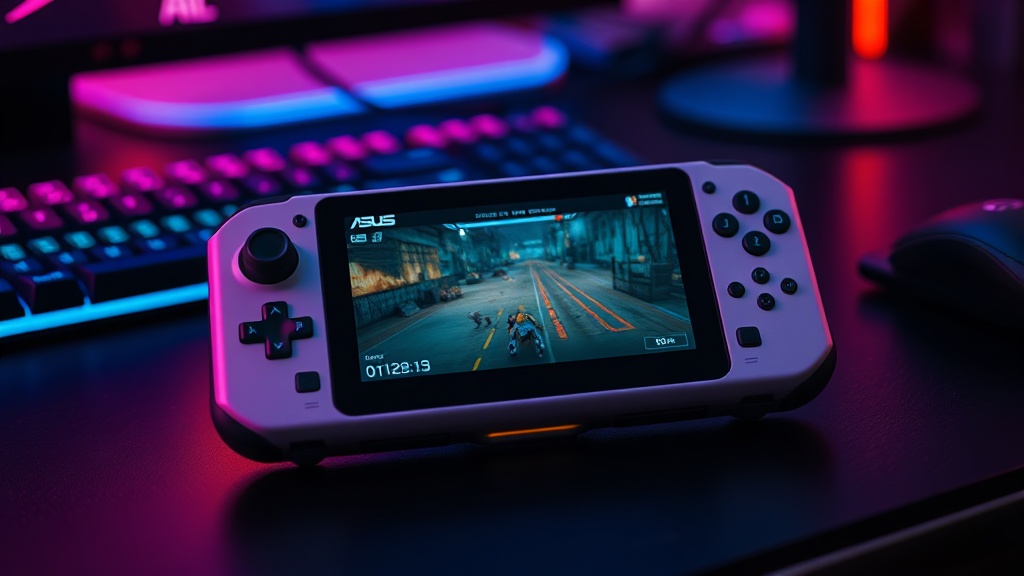
The ASUS ROG Ally X packs a Ryzen Z1 Extreme, 24GB of RAM, and an 80Wh battery into a 7-inch 1080p 120Hz handheld. After a month of gaming, here is whether raw power is enough to overcome Windows 11's handheld awkwardness.
A
admin
April 13, 2026 · 14 min read
Review8.5/10
Overall Score
8.5
out of 10Performance
9.5
Display
8.5
Battery Life
7.5
Build Quality
8.5
Value
8
One Month With ASUS's Flagship Handheld
The handheld gaming PC market has matured faster than almost anyone predicted. What started as a niche experiment with the original Steam Deck in 2022 has grown into a legitimate product category with multiple serious contenders. The ASUS ROG Ally X sits at the performance end of that spectrum, offering the most powerful hardware you can get in a handheld form factor.
The Ally X launched at $799 with a Ryzen Z1 Extreme processor, 24GB of LPDDR5X-7500 RAM, a 1TB M.2 2280 SSD, an 80Wh battery, and a 7-inch 1080p 120Hz IPS display. On paper, it is the handheld that should make every other option obsolete. In practice, the story is more complicated than the spec sheet suggests.
We have been using the ROG Ally X as our primary portable gaming device for a month. Not a weekend of benchmark runs. A full month of actual gaming sessions: commute gaming, couch gaming, travel gaming, and the kind of extended sessions where comfort, battery life, and software experience matter as much as raw frame rates.
Design and Ergonomics
The Ally X gets the physical design right. ASUS clearly studied where the original Ally fell short and made targeted improvements. The grip contours are deeper, filling your palm more completely and reducing the fatigue that plagued the original during long sessions. The overall shape is closer to an Xbox controller bisected by a screen, which is the right ergonomic template for a device you hold for hours.
At 678 grams, the Ally X is noticeably heavier than the Steam Deck OLED (640g) and significantly heavier than the original Ally (608g). In short sessions under an hour, the weight is not an issue. In sessions stretching past 90 minutes, you start to notice it. Playing in bed with the device held above your face becomes tiring faster than with lighter competitors. This is the tax you pay for the 80Wh battery, and it is a reasonable trade-off, but it is worth acknowledging.
The button layout is standard Xbox configuration with ABXY face buttons, dual analog sticks, bumpers, and analog triggers. Everything feels premium. The sticks have improved springs rated for 5 million cycles and offer precise, smooth movement with minimal deadzone. The D-pad is a significant improvement over the original Ally, with clearer directional clicks that make fighting games and retro titles more enjoyable.
Two rear paddle buttons sit behind the grips, and they are genuinely useful for mapping common actions without taking your thumbs off the sticks. The placement is natural, and we found ourselves using them constantly after the first few days.
Build quality is solid throughout. The chassis has a slight flex under aggressive pressure, but nothing concerning during normal use. The plastic construction keeps weight manageable and does not feel cheap. The white color scheme is distinctive but does show smudges and dirt more readily than darker alternatives.
Display
The 7-inch 1080p 120Hz IPS display is good but not exceptional by 2026 standards. At 1920x1080, you get sharp text and detailed game visuals that take full advantage of the hardware's rendering capabilities. The 120Hz refresh rate means smoother motion in games that can hit those frame rates, and FreeSync support eliminates tearing at variable frame rates.
Color accuracy is reasonable for an IPS panel. Games look vibrant and colorful, and we had no complaints about the display during gameplay. It does not match the deep blacks and infinite contrast of the Steam Deck's OLED panel, which is the Ally X's most significant display disadvantage. Dark scenes in games like Resident Evil 4 and Elden Ring look noticeably better on the OLED Steam Deck, where shadows have depth rather than the grayish wash that IPS panels produce.
Peak brightness is adequate for indoor use but struggles in direct sunlight. Playing outdoors on a sunny day is possible but requires maximum brightness and some squinting. The Steam Deck OLED handles sunlight meaningfully better.
Touch response is accurate and responsive, which matters for navigating Windows interfaces. The display supports ten-point multi-touch, and using it for desktop-mode navigation is adequate if not particularly enjoyable.
Performance Benchmarks
This is where the ROG Ally X justifies its existence. The AMD Ryzen Z1 Extreme combines 8 Zen 4 cores with 12 RDNA 3 compute units, and paired with 24GB of LPDDR5X-7500 RAM, it delivers performance that no other handheld can match.
We tested across a range of demanding titles at 1080p, which is the Ally X's native resolution. The Turbo power mode (25W TDP) was used for all benchmarks:
Cyberpunk 2077 (FSR Quality, Medium settings): 48-55 FPS average. Playable and visually impressive for a handheld. The game's dense open world benefits from the 24GB RAM.
Elden Ring (Medium settings): 45-55 FPS. Consistent performance with minimal stuttering during large-scale encounters. Shadow of the Erdtree expansion areas maintained similar frame rates.
Baldur's Gate 3 (Medium settings): 35-45 FPS. This game is CPU-intensive and the Ally X handles it reasonably well, though busy combat scenes with multiple spell effects can push below 35.
Forza Horizon 5 (High settings): 55-65 FPS. One of the best showcase titles for the Ally X, running smoothly with excellent visual quality.
Shadow of the Tomb Raider (Medium settings): 52-64 FPS. Solid performance that demonstrates the Z1 Extreme's capability with optimized titles.
Starfield (Low-Medium settings): 30-40 FPS. Playable but clearly pushing the hardware's limits. The 24GB RAM helps prevent the stuttering that 16GB handhelds experience in this game's large environments.
Hades II (Max settings): 60 FPS locked. Less demanding titles run flawlessly at full settings and full frame rate.
The 24GB of RAM deserves special mention. While 16GB is sufficient for most current games, we are already seeing titles where 16GB causes asset streaming stutters and texture pop-in that 24GB eliminates. Starfield, Cities: Skylines 2, and modded versions of Baldur's Gate 3 all benefited from the extra memory. As game requirements increase, the Ally X's 24GB will provide meaningful headroom that 16GB handhelds will not have.
At 720p, which reduces the rendering load but still displays on the 1080p screen with upscaling, most titles gained 15-25 percent in frame rate. This is a viable option for maximizing battery life in demanding games while maintaining playable visual quality through FSR upscaling.
Battery Life
The 80Wh battery is the largest in any handheld gaming PC, doubling the 40Wh cell in the original Ally. In absolute terms, it provides meaningfully more gaming time. In relative terms, it is still not enough for the Z1 Extreme's power appetite.
Our real-world battery life tests at 50 percent brightness:
Light games (Hades II, Stardew Valley): 3 to 3.5 hours at Performance mode (15W)
Medium games (Forza Horizon 5, Persona): 2 to 2.5 hours at Performance mode
Demanding games (Cyberpunk 2077, Elden Ring): 1.5 to 2 hours at Turbo mode (25W)
Media playback (video streaming): 5 to 6 hours
Sleep/standby: Roughly 2-3 percent drain per hour in connected standby
These numbers are better than the original Ally by 40 to 60 percent, which is a meaningful improvement. But 1.5 hours of battery life in a demanding game is still short enough that you will want a charger nearby for most gaming sessions. The Steam Deck OLED, with its less powerful but more efficient hardware, delivers 1.5 to 3 hours in similarly demanding titles, but its typical gaming session lasts 30 to 45 minutes longer due to lower TDP.
The included 65W USB-C charger is compact and charges the Ally X from zero to 50 percent in about 30 minutes. USB-C PD charging from third-party chargers works well, and we successfully used a 45W laptop charger for slower but adequate charging on the go.
ASUS provides multiple TDP profiles (Silent, Performance, Turbo) accessible through the Armoury Crate software, and dialing down to Performance mode (15W) extends battery life significantly while still delivering playable frame rates in most titles. Learning to use the right TDP profile for the right game is essential to getting the most out of the Ally X's battery.
Windows 11 Experience
This is the section that determines whether the Ally X or the Steam Deck is right for you, and it is where the Ally X's biggest weakness lies.
Windows 11 was not designed for a 7-inch touchscreen. It was not designed for a device without a keyboard. It was not designed for a device that you want to pick up and immediately start playing a game. Every interaction with the Windows desktop, from dismissing update notifications to managing file dialogs to adjusting system settings, is an exercise in patience and precision tapping on a screen that was built for a mouse cursor.
ASUS tries to mitigate this with Armoury Crate SE, a custom launcher that provides a more console-like interface. It works reasonably well for launching games and adjusting performance settings. But the moment you need to do anything outside Armoury Crate, step through a game launcher's first-time setup, deal with a UAC prompt, or troubleshoot a driver issue, you are back in the full Windows desktop trying to tap tiny buttons with your thumbs.
Windows updates are the most frustrating element. The Ally X occasionally restarts for updates at inconvenient times, and the post-update setup process can eat into gaming time. SteamOS on the Deck handles updates more gracefully, with smaller, faster updates that rarely require restarts.
Game launcher fragmentation is another Windows-specific annoyance. Playing a Steam game? Launch through Steam. An Xbox game? Launch through the Xbox app or Game Pass. An Epic game? Open the Epic launcher. Each has its own overlay, its own notification system, and its own quirks. The Steam Deck consolidates everything through SteamOS with a unified interface that makes the handheld feel like a gaming console rather than a shrunken laptop.
That said, Windows compatibility is also the Ally X's greatest strength. Every PC game that runs on Windows runs on the Ally X. There is no Proton compatibility layer, no checking compatibility lists, no troubleshooting Linux-specific issues. Game Pass works natively. Anti-cheat in online games works without issues. Modding is straightforward. If you have a large PC game library spanning multiple storefronts, the Ally X gives you access to all of it without compromise.
The trade-off is clear: Windows offers universal compatibility at the cost of a less polished handheld experience. SteamOS offers a superior handheld experience at the cost of occasional compatibility gaps. Which matters more depends entirely on your game library and your tolerance for Windows quirks on a small screen.
Game Compatibility
Thanks to Windows 11, game compatibility on the Ally X is essentially universal. Every title we tested from Steam, Epic Games Store, GOG, Battle.net, and Xbox Game Pass installed and ran without compatibility issues.
Xbox Game Pass integration is a particular strength. The Ally X is effectively the best portable Game Pass device available, giving you access to hundreds of titles with no compatibility concerns. If Game Pass is central to your gaming habits, the Ally X is the obvious choice over the Steam Deck.
Online multiplayer games with kernel-level anti-cheat (Valorant, Fortnite, Destiny 2) work without any issues on the Ally X. This remains a pain point for Steam Deck users running these games through Proton.
Emulation performance is also excellent. The Z1 Extreme handles PlayStation 2, GameCube, Wii, and Switch emulation without breaking a sweat, and even PlayStation 3 emulation via RPCS3 is viable for many titles. The 24GB of RAM provides headroom for emulators that benefit from large memory caches.
Comparison to Steam Deck OLED
The Steam Deck OLED remains the Ally X's primary competitor, and the comparison comes down to priorities.
Choose the ROG Ally X if:
- You want maximum performance and future-proofing
- You play games across multiple storefronts (especially Game Pass)
- You play online games with kernel-level anti-cheat
- You are comfortable with Windows and value universal compatibility
- You prefer a 1080p display for sharper text and UI elements
Choose the Steam Deck OLED if:
- You prioritize the overall handheld experience over raw specs
- You primarily play Steam games
- You value the superior OLED display with deeper blacks
- You want longer effective battery life in demanding games
- You prefer a more console-like, pick-up-and-play experience
- Price matters (the Deck starts at $549 vs. the Ally X at $799)
In raw performance, the Ally X wins decisively. In display quality, the Steam Deck's OLED is clearly superior. In software experience, SteamOS is a more polished handheld operating system. In value, the $250 price difference favors the Steam Deck. In game compatibility breadth, Windows gives the Ally X the edge.
Neither device is the wrong choice. They serve different priorities, and the best handheld for you depends on which of those priorities matters most.
Who Should Buy the ROG Ally X?
The ROG Ally X is the right handheld for a specific kind of gamer. If you have a large PC game library spanning Steam, Epic, GOG, and Game Pass, and you want a single device that plays everything without compatibility concerns, the Ally X delivers. If you play competitive online games that require anti-cheat support, it is the only viable handheld option. If you want the absolute best performance available in a handheld for demanding AAA titles, nothing else comes close.
It is not the right handheld for casual gamers who want a simple, console-like experience. The Windows overhead, the weight, the price, and the battery life limitations all work against casual use. For that audience, the Steam Deck OLED is a better fit.
The Verdict
The ASUS ROG Ally X is an impressive piece of hardware that is limited by software. The Ryzen Z1 Extreme processor, 24GB of RAM, 80Wh battery, and 1080p 120Hz display combine to deliver the most powerful portable gaming experience available in 2026. Build quality is solid, the ergonomics are comfortable, and the controls are excellent.
But Windows 11 remains an awkward partner for handheld gaming. The touch-hostile interfaces, update interruptions, and launcher fragmentation create friction that the Steam Deck avoids through SteamOS. Battery life, while improved over the original Ally, still falls short of what most gamers would consider adequate for truly portable use.
At $799, the Ally X is a premium product that delivers premium performance. If you know you want a Windows handheld and you value power above all else, it is the best one you can buy. If you are on the fence between the Ally X and the Steam Deck OLED, ask yourself honestly how many of your games require Windows and how much you value a polished handheld experience versus raw capability. The answer to those questions will tell you which device belongs in your hands.
What We Liked
- Most powerful handheld gaming PC available
- 24GB RAM is genuinely future-proof for upcoming titles
- Excellent 1080p gaming performance across demanding titles
- Good ergonomics with comfortable grip and responsive controls
What Could Improve
- Windows 11 remains awkward for handheld use
- Battery life is mediocre at 1.5 to 3 hours in demanding games
- Heavy at 678g for extended handheld sessions
- Expensive at $799 compared to Steam Deck OLED
The Verdict
The ROG Ally X is the best Windows handheld you can buy and the most powerful portable gaming device available. The Ryzen Z1 Extreme, 24GB RAM, and 80Wh battery deliver a genuine AAA gaming experience in a handheld form factor. But Windows 11 continues to hold back the experience with touch-hostile interfaces, update interruptions, and software quirks that SteamOS handles more gracefully. If you want maximum power, access to your entire PC game library, and are willing to deal with Windows, the Ally X is excellent. If you want a smoother, more console-like experience, the Steam Deck OLED remains the better overall handheld.
Was this article helpful?
Join the conversation — sign in to leave a comment and engage with other readers.
Loading comments...
Related Posts
gaming
Corsair Galleon 100SD Review: Keyboard Meets Stream Deck
Apr 13, 2026gaming
Nvidia RTX 5080 Review: The Sweet Spot GPU for Gamers in 2026
Apr 4, 2026gaming
Best Gaming Handhelds 2026: Steam Deck, ROG Ally, Legion Go, and MSI Claw Compared
Apr 13, 2026hardware
AMD Ryzen 7 9850X3D Review: The New Gaming King?
Apr 13, 2026Enjoyed this article?
Get the best tech reviews, deals, and deep dives delivered to your inbox every week.